To resolve some curiosities about web servers, I planned to take an online course covering the basics of Kubernetes and build a simple web server. In the middle of that, I belatedly heard from a colleague about the news that Ingress NGINX was being retired. It had already been announced on November 11, 2025 (Pepero Day) that the project would be discontinued in March 2026, and it awakened in me—an FE developer who had no interest in infrastructure—a fear of the change that had been happening amid my indifference.
It may be a belated write-up, but in order to take an interest in infrastructure and web servers going forward and to embrace that area as my own, I plan to briefly look at Ingress and its replacement, the Gateway API.
Ingress
Ingress is an L7 resource for routing HTTP/HTTPS traffic coming from outside a Kubernetes cluster to internal services. The actual traffic is handled not by the Ingress but by the Ingress Controller, and the Ingress serves to provide the defined routing rules.
I will briefly organize the components of Ingress: Ingress Resource / Ingress Controller / Ingress Class.
Ingress Resource
The Ingress Resource defines the paths on which the actual traffic will be handled, and specifies the controller that will handle the traffic via ingressClassName.
yamlapiVersion: networking.k8s.io/v1
kind: Ingress
metadata:
  name: minimal-ingress
spec:
  ingressClassName: nginx-example
  rules:
    - http:
        paths:
          - path: /testpath
            pathType: Prefix
            backend:
              service:
                name: test
                port:
                  number: 80
Ingress Controller
The Ingress Controller checks the Ingress Resources defined through the Kubernetes API server and handles the actual traffic. It is not included in a default Kubernetes environment, so a separate installation is required; widely used controllers include ingress-nginx, Traefik, HAProxy, and Kong.
Ingress Class
There can be multiple types of Ingress Controllers in a Kubernetes cluster environment. The Ingress Class makes it possible to specify a reference for which Ingress Resource uses which controller in a Kubernetes cluster environment.
yamlapiVersion: networking.k8s.io/v1
kind: IngressClass
metadata:
  name: external-lb
spec:
  controller: example.com/ingress-controller
  parameters:
    apiGroup: k8s.example.com
    kind: IngressParameters
    name: external-lb
Ingress Traffic Flow
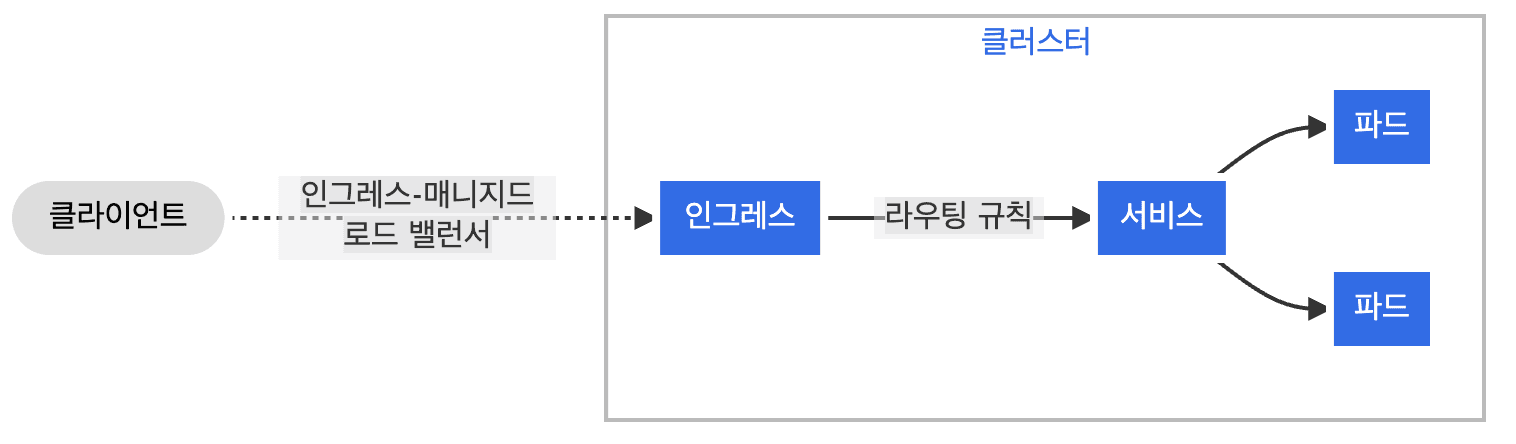
- Client request: The user sends an HTTPS request to the domain
https://example.com. - L4 entry (External LB): A LoadBalancer outside the cluster receives the request and forwards it to the Ingress Controller pod running within a cluster node.
- L7 analysis and decryption: The Ingress Controller receives the request, performs TLS decryption (termination), and extracts the Host and Path information from the HTTP headers.
- Routing rule matching: The controller compares the extracted information against the Ingress Resource rules to decide which Service to send it to.
- Final direct delivery (Direct Path): Without going through the service's ClusterIP, the controller selects one of the latest Endpoints (the list of pod IPs) connected to that service and sends the traffic directly to the pod.
Ingress NGINX Retirement
Ingress NGINX is the most popular controller and is used in many projects, yet it is said that it lacked the manpower to actually maintain it. It had been maintained by one or two developers working on it here and there after work or on weekends, and although they made efforts to resolve security flaws and technical debt, it was ultimately decided to retire the project.
After March 2026, updates will no longer be provided, and migration to another Ingress controller or to the Gateway API is recommended.
Along with the retirement of Ingress NGINX, the official documentation also recommends using the Gateway API due to structural flaws in Kubernetes Ingress itself.
- L7-only design structure of the Ingress API cannot support the L4 standard
Ingress is made for HTTP/HTTPS, so a separate, non-standard implementation is required to handle TCP/UDP.
yamlnginx.ingress.kubernetes.io/backend-protocol: "TCP"
- A single-resource structure in which roles cannot be separated
In Ingress, TLS and HTTP Route handling are done together, resulting in a structure where the infrastructure administrator and the service developer must manage the configuration together. In this process, they can affect each other's management areas or cause conflicts.
yamlapiVersion: networking.k8s.io/v1
kind: Ingress
metadata:
  name: simple-ingress
spec:
  tls: # TSL settings
    - hosts:
        - example.com
      secretName: example-tls
  rules: # HTTP Route
    - host: example.com
      http:
        paths:
          - path: /
            pathType: Prefix
            backend:
              service:
                name: my-service
                port:
                  number: 80
- Annotation-centric non-standard extensions
Because of the functional limits supported by Ingress, needed features must be used through non-standard extensions.
yamlnginx.ingress.kubernetes.io/canary: "true"
nginx.ingress.kubernetes.io/canary-weight: "10"
nginx.ingress.kubernetes.io/rewrite-target: /
nginx.ingress.kubernetes.io/limit-rps: "5"
Watching the most popular service in an ecosystem being retired, I again realized that nothing lasts forever. Even a program written with rust-free code eventually becomes old, problems arise, and a time comes to replace it with something new.
Below, I plan to look at the Gateway API, which is recommended as a replacement for Ingress, and examine in what way and structure it solved the problems seen above.
Gateway API
The Gateway API is designed based on organizational roles, and is a set of APIs that separates network infrastructure provisioning (Gateway) from routing (Route) configuration.
It designed the cluster's external entry and routing—which were cited as structural problems in Ingress—as a role-separated approach, and supports declaring standard-based features within fields for use.
I will briefly organize the components of the Gateway API: GatewayClass / Gateway Controller / Gateway / Route.
GatewayClass
The GatewayClass defines the type of load balancer to use in the cluster and which controller to use.
yamlapiVersion: gateway.networking.k8s.io/v1
kind: GatewayClass
metadata:
  name: external-nginx
spec:
  controllerName: k8s.io/gw-controller-nginx
Gateway Controller
The Gateway Controller watches the Kubernetes API server in real time, and serves to convert the Gateway API resources declared by the user into actual network infrastructure configuration and to synchronize them.
Gateway
The Gateway defines the network entry point through which the actual traffic comes in. Through listener configuration, it opens a specific port, specifies the protocol to be used on that port (HTTP, HTTPS, TCP, etc.), and defines certificate connection and encryption/decryption policies for HTTPS secure communication.
yamlapiVersion: gateway.networking.k8s.io/v1
kind: Gateway
metadata:
  name: prod-gateway
spec:
  gatewayClassName: external-nginx
  listeners:
    - name: https
      port: 443
      protocol: HTTPS
      tls:
        mode: Terminate
        certificateRefs:
          - name: production-certs
      allowedRoutes:
        namespaces:
          from: All
Route
The Route serves to decide which service the traffic that came into the Gateway will be sent to, and includes HTTPRoute / TCPRoute / UDPRoute, and others.
Unlike Ingress, which was mainly limited to handling web traffic (HTTP/HTTPS), the Gateway API's Route is subdivided into resources per protocol, supporting more precise and flexible routing configuration.
Gateway API Traffic Flow
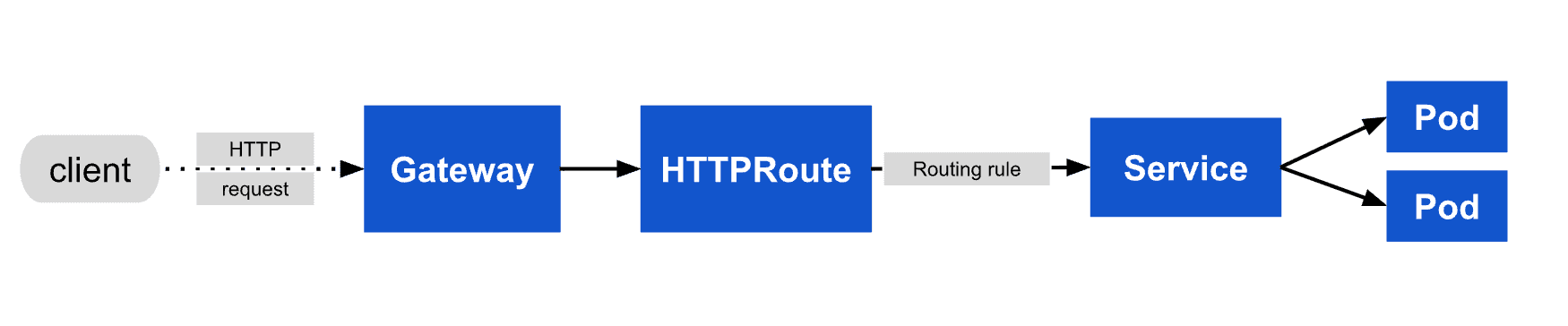
- Client request: The user sends a request to
https://example.com. - L4 entry (Gateway Listener): The request reaches the Gateway Listener through the assigned external IP. Here it checks the port (443) and performs TLS decryption.
- L7 proxy reception: The decrypted HTTP packet is received by the L7 Proxy (Envoy, Nginx).
- Routing rule matching (HTTPRoute): The proxy queries the injected HTTPRoute rules and checks whether
Host: example.comandPath: /match. - Endpoint lookup: It checks the Endpoints (the list of pod IPs) of the service connected to the matching rule.
- Final delivery: The proxy sends the traffic directly to the actual pod IP without going through the service.
Ingress & Gateway API with Minikube
Below, I will run through a tutorial that very simply sets up Ingress and Gateway API environments using minikube. It is a very simple exercise, but I will begin with the expectation of looking at the basic traffic flow and perhaps gaining some hints about aspects worth attending to in practice within that flow.
Installation required: minikube / kubectl / docker
Ingress Tutorial
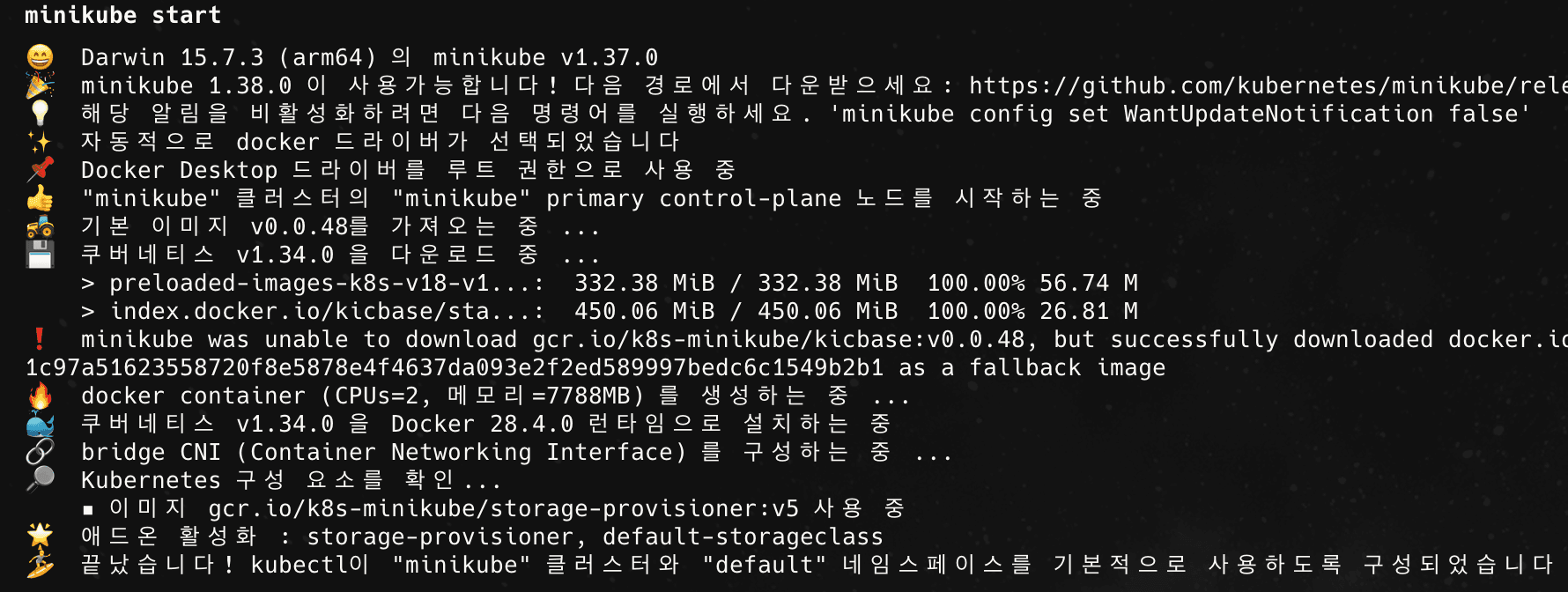
- Start Minikube
The command below downloads the resources needed when starting minikube and composes the cluster.
bash$ minikube start
- Enable the Ingress Controller
Enable the ingress addon within the minikube cluster.
bash$ minikube addons enable ingress

Through the minikube tunnel command, which is provided as a guidance note when enabling the ingress addon, access via the 127.0.0.1 IP becomes possible.
If you are running Minikube using the Docker driver on macOS, you may not be able to access the internal cluster IP. Enable minikube tunnel to make the IP accessible. Here, you can think of the role that minikube tunnel plays in a local environment as being the role of an External LoadBalancer.
bash$ minikube tunnel

You can check whether the ingress Controller is enabled by verifying its Running status via the command below.
bash$ kubectl get pods -n ingress-nginx

- Create a web server and Service
Create a web server to test as a deployment using a simple sample image.
bash$ kubectl create deployment web --image=gcr.io/google-samples/hello-app:1.0

Through the expose command, the created deployment is analyzed to automatically generate a service. Creating with expose lets you create a Service simply, but if additional detailed configuration is needed, modification is required. For a production environment, rather than using expose, it is reasonable to manage a Service tailored to the project via yaml.
bash$ kubectl expose deployment web --port=8080 --target-port=8080

- Create the Ingress resource
Create Ingress.yaml and define the rules for which service the domain requests will be sent to.
yamlapiVersion: networking.k8s.io/v1
kind: Ingress
metadata:
  name: example-ingress
  annotations:
    nginx.ingress.kubernetes.io/rewrite-target: /
spec:
  rules:
    - host: hello-world.info
      http:
        paths:
          - path: /
            pathType: Prefix
            backend:
              service:
                name: web
                port:
                  number: 8080
Apply the created Ingress.yaml resource through the command below.
bash$ kubectl apply -f ingress.yaml

- Configure the local hosts file
Register the domain (host) defined in the ingress resource against the IP confirmed in the ingress enablement step, in the hosts file.
Access /etc/hosts, check the IPs and domains configured in the file, and add the information to be used for testing.
- 127.0.0.1 hello-world.info
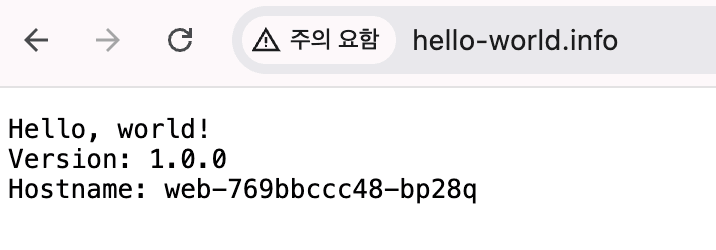
- Verify domain access
You can confirm that access works normally by accessing the domain in a browser.
Gateway API Tutorial
- Reset Minikube
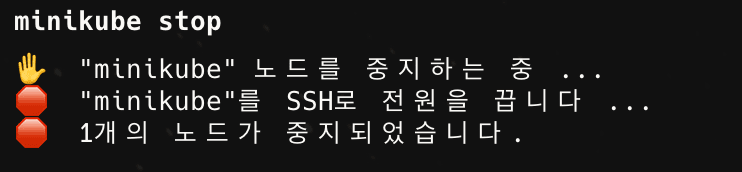
Before starting, stop the minikube node used in the previous ingress tutorial and reset the cluster.
bash$ minikube stop
$ minikube delete --all --purge

- Start minikube
Start minikube the same as in the ingress tutorial.
bash$ minikube start
- Install the Gateway API CRDs
Because the default Kubernetes resources do not include the Gateway API, install it in the cluster.
bash$ kubectl apply -f https://github.com/kubernetes-sigs/gateway-api/releases/download/v1.0.0/standard-install.yaml
- Install and enable the Gateway Controller
Install the Envoy Gateway controller and check its status.
bash$ kubectl apply -f https://github.com/envoyproxy/gateway/releases/download/v1.0.0/install.yaml

bash$ kubectl get pods -n envoy-gateway-system

- Create the GatewayClass and Gateway
Define a GatewayClass to reference the Controller to be used.
yamlapiVersion: gateway.networking.k8s.io/v1
kind: GatewayClass
metadata:
  name: envoy-gateway
spec:
  controllerName: gateway.envoyproxy.io/gatewayclass-controller
bash$ kubectl apply -f gateway-class.yaml
Create a Gateway that serves as the entrance through which traffic comes in.
yamlapiVersion: gateway.networking.k8s.io/v1
kind: Gateway
metadata:
  name: my-gateway
  namespace: default
spec:
  gatewayClassName: envoy-gateway
  listeners:
    - name: http
      port: 80
      protocol: HTTP
      allowedRoutes:
        namespaces:
          from: All
bash$ kubectl apply -f gateway.yaml
- Create a web server and Service
Create a web server and Service the same as created in the ingress tutorial.
bash$ kubectl create deployment web --image=gcr.io/google-samples/hello-app:1.0
$ kubectl expose deployment web --port=8080 --target-port=8080
- Create the HTTPRoute
Define which domain goes to which service. In Ingress, the certificate and Route handling are all defined in the ingress resource, but in the Gateway API, the Gateway and Route resources are defined separately.
yamlapiVersion: gateway.networking.k8s.io/v1
kind: HTTPRoute
metadata:
  name: web-route
spec:
  parentRefs:
    - name: my-gateway
  hostnames:
    - "hello-world.info"
  rules:
    - matches:
        - path:
            type: PathPrefix
            value: /
      backendRefs:
        - name: web
          port: 8080
bash$ kubectl apply -f route.yaml
- Verify domain access
Just as in the ingress tutorial, run the local hosts configuration and minikube tunnel, access the domain, and verify that access works normally.
Ingress & Gateway API Comparison
Finally, I will organize the differences between Ingress and the Gateway API that I learned by going through the content organized above and the tutorials.
First, I could clearly see the separation of roles. In the case of Ingress, a single resource handles the host, paths, and various settings, but the Gateway API is composed in a form where the area for the network entry point (Gateway) and the area for service routing (HTTPRoute) can be managed separately. The network entry point for traffic can be managed by the infrastructure owner and service traffic by the service developer in service routing, allowing roles to be divided and managed more clearly.
Second is the support method for feature extension. In Ingress, annotations are used to extend features, whereas in the Gateway API, features could be used through standardized fields.
yaml# ingress
apiVersion: networking.k8s.io/v1
kind: Ingress
metadata:
  name: example-ingress
  annotations:
    nginx.ingress.kubernetes.io/rewrite-target: ...

# HTTPRoute
apiVersion: gateway.networking.k8s.io/v1
kind: HTTPRoute
metadata:
  name: web-route
spec:
  ...
  rules:
  - matches:
    - path:
        type: PathPrefix
        value: ...
    filters:
    - type: URLRewrite
      urlRewrite:
        path:
          type: ReplacePrefixMatch
          replacePrefixMatch: ...
Third is traffic control: whereas Ingress serves as a web server entrance for HTTP (L7), the Gateway API uses the Gateway as a network entry point (L4) and can manage handling of various traffic, such as serving as a web server entrance for HTTPRoute (L7) or handling TCPRoute, UDPRoute, and more.
Reflecting on Ingress & Gateway API
The content organized above is material that is very well summarized in the Kubernetes official documentation or in some blog somewhere. It may be very easy content for some, but in my position, where I don't often work with it hands-on in practice, it seems to be quickly forgotten the moment I turn away.
Prompted by hearing the news of the Ingress NGINX retirement, I felt I should organize it at least briefly, and rather than merely reading, I organized the content with the mindset of studying by taking notes, and by running through a simple tutorial I tried to look a bit more closely at this Ingress NGINX retirement situation.
Someday, the currently popular services may also run into some technical or unsolvable problem and reach the day they are retired. If, at that time, I make an effort to look a bit more closely—as I did now—at what the problems are and what alternatives and solutions are used to work through them, then when a hard-to-solve problem is given to me in the future, I hope I might recall these preceding processes and receive some help.

"You can't connect the dots looking forward; you can only connect them looking backward." - Steve Jobs -