As a frontend developer, the variety of AI tools I use has grown lately, and I'm feeling the pace of AI's advancement firsthand. I feel myself relying on AI for more and more things, to the point where I now feel inconvenienced when I can't use it even in my actual work. In the middle of this, seeing a developer friend of mine who doesn't just use AI but studies and understands it more deeply, I felt that I, too, as a developer, need to look at AI not merely as a user but from a developer's perspective.
By the time I'm writing this, MCP may already be an old, once-hot topic, but there was a time when developers kept talking about it: MCP! MCP! Back then, I felt like I was talking about MCP without actually understanding exactly how it's structured or how it works, like someone watching YouTube and posing as an expert. Becoming an expert would be hard, but I want to summarize MCP in a way that's simple yet perhaps a little in-depth.

What Is MCP
MCP (Model Context Protocol) is a protocol that standardizes how the context provided to an LLM (Large Language Model) is structured, managed, and communicated when the model interacts with an application.
It's a new structured API approach proposed by OpenAI, aiming to provide more explicit and hierarchical context than the way information is injected into prompts.
MCP's Main Purpose
MCP aims to overcome the limitations of prompt-based control by enabling an LLM to interact with various external resources and tools in a structured way. It provides an explicit interface for the LLM to call external APIs or functions, making the automation of various tasks possible.
By managing context in units of conversation sessions (Threads), it allows the model to respond while more accurately reflecting previous messages and user settings. It also lets you control what information is provided to the model, and this can be clearly recorded and traced, which is advantageous for debugging and security verification.
MCP Core Concepts
| Element | Description |
|---|---|
| Thread | The unit of a conversation session. A unique context store that tracks a single user's flow |
| Messages | Messages contained within a Thread. Natural-language messages such as user input or model responses |
| Tools | External functions (APIs) the model can call, e.g., search, code execution |
| Data Context | Structured data that can be provided to the model. e.g., user profile, recent activity |
| Instructions | Guidelines or behavioral guidance for the model to follow. e.g., “speak in a customer-service style” |
MCP Architecture
| Element | Description | |
|---|---|---|
| MCP Host | An application that includes an MCP client and communicates with MCP servers | Claude Desktop, IDE, AI tools |
| MCP Client | Maintains a connection with an MCP server within the MCP host and handles communication | |
| MCP Server | A program that exposes specific capabilities through the MCP protocol | Tools, Resources, Prompts |
| Local Data Source | Computer files, databases, and services the MCP server can securely access | |
| Remote Service | External systems the MCP server can connect to | API |
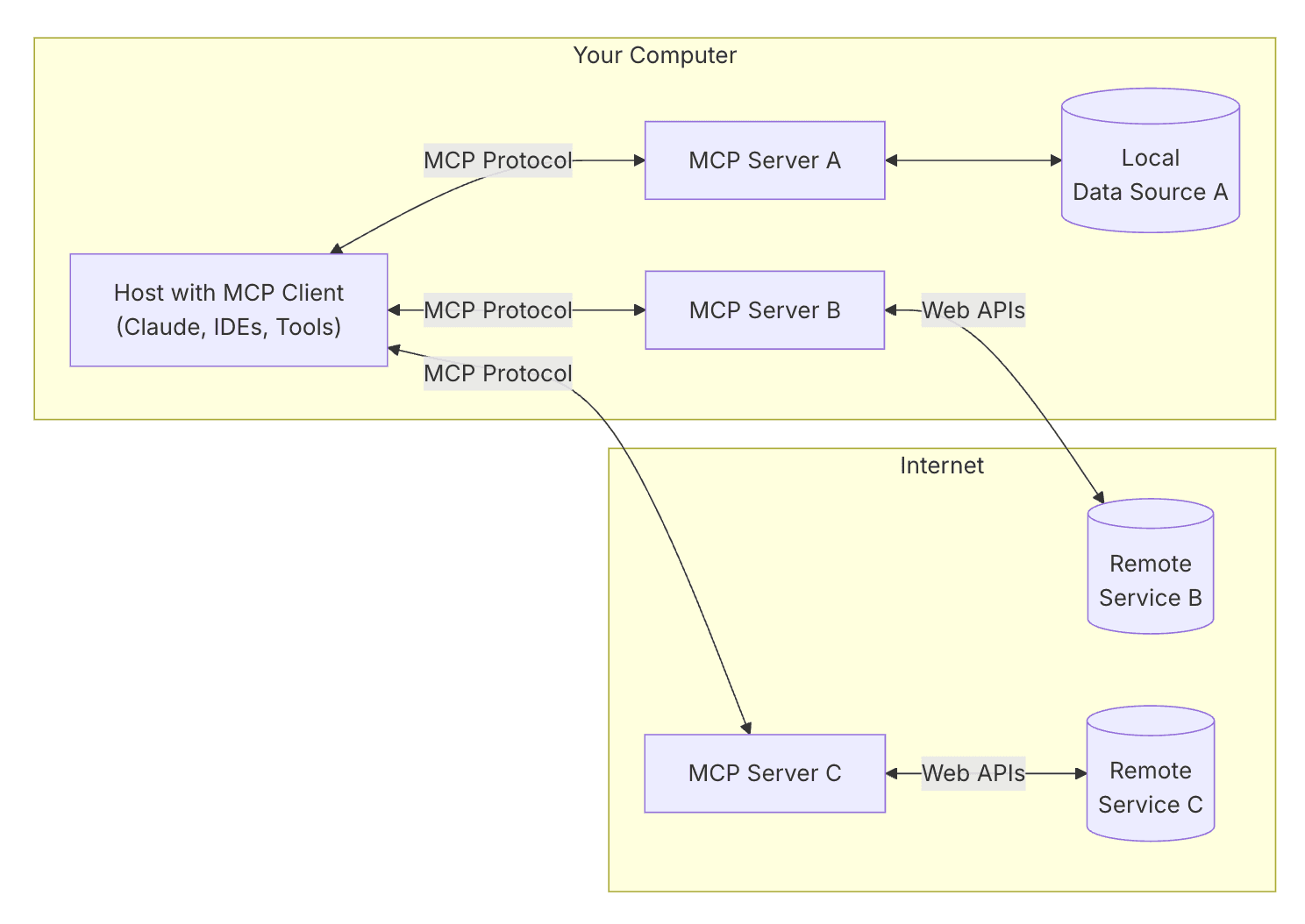
- Ref: General architecture
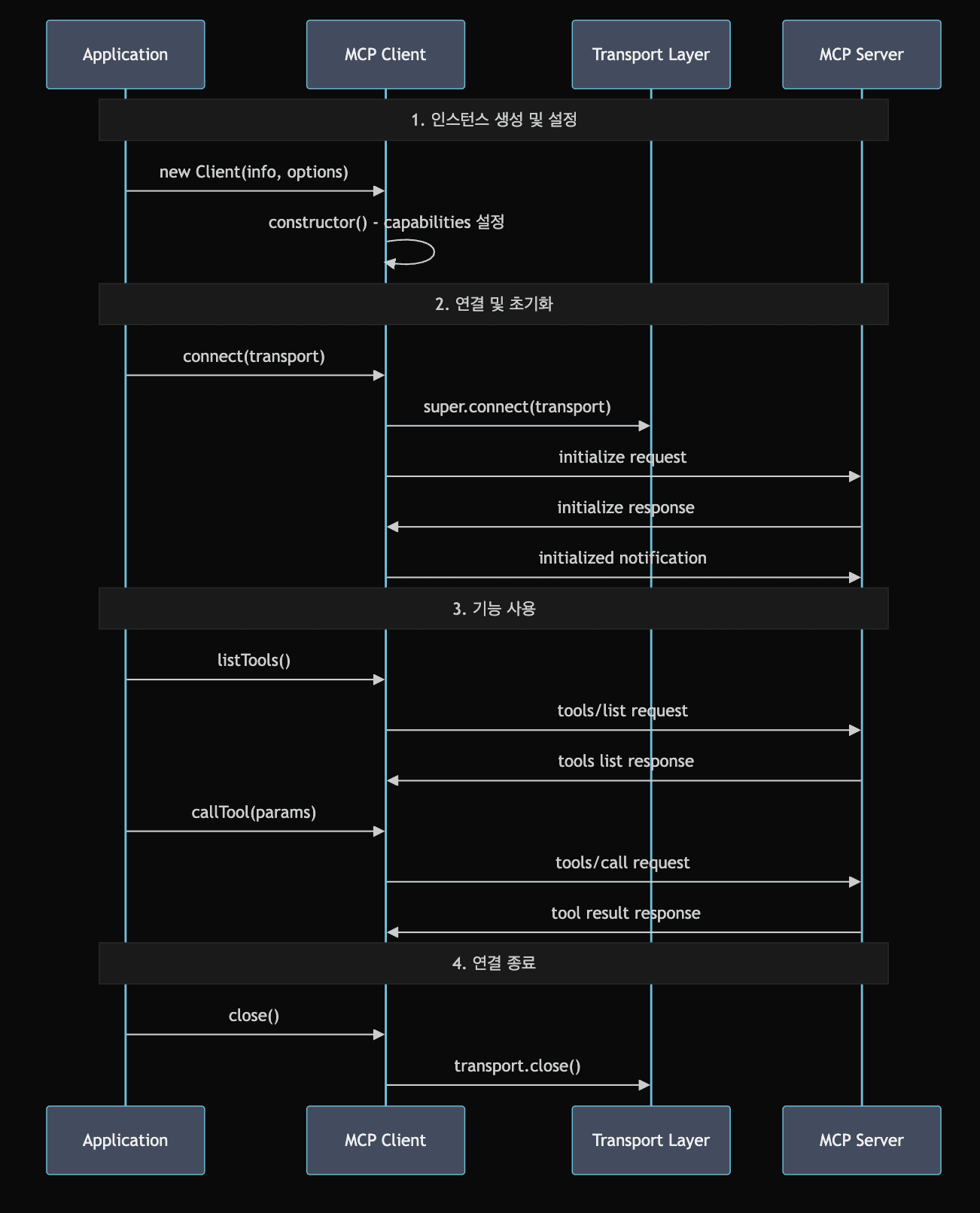
- Ref: claude-4-sonnet
MCP TypeScript SDK
Github - modelcontextprotocol/typescript-sdk
The summary of MCP above is based on the Model Context Protocol's Introduction. Building on the MCP architecture from that content, I plan to analyze the TypeScript SDK and examine how each component is actually implemented in code. With a bit of excitement and fear about a domain I'm curious about but don't know well, I'll move forward slowly, as if setting out on an adventure into a new forest.
- MCP provides SDKs for C#, Java, Kotlin, Python, Ruby, Swift, and TypeScript.
- MCP Host
- MCP Client
- MCP Server
MCP Host
In MCP, it plays the role of running and managing each client and server. Based on the arguments passed via the CLI, it runs runClient when starting a client and runServer for a server.
The MCP host acts as a central manager, serving as the entry point, selecting the Transport layer, and taking charge of the Express server setup.
src/cli.ts
tsxasync function runClient(url_or_command: string, args: string[]) {
  // create a client instance and manage the connection
}

async function runServer(port: number | null) {
  // create a server instance and set up the Express app
}

// command routing (decide client/server mode)
const command = args[0];
switch (command) {
  case "client": runClient(...); break;
  case "server": runServer(...); break;
}
The MCP host role is also partly carried out within each client and server logic, such as abstracting the Transport layer on the client and managing protocol initialization on the server.
src/cli.ts
tsxasync function runClient(url_or_command: string, args: string[]) {
  ...
  // select the Transport based on the protocol
  if (url?.protocol === "http:" || url?.protocol === "https:") {
	  clientTransport = new SSEClientTransport(new URL(url_or_command));
	} else if (url?.protocol === "ws:" || url?.protocol === "wss:") {
	  clientTransport = new WebSocketClientTransport(new URL(url_or_command));
	} else {
	  clientTransport = new StdioClientTransport({...});
	}
	...
}
src/server/index.ts
tsxexport class Server<
  RequestT extends Request = Request,
  NotificationT extends Notification = Notification,
  ResultT extends Result = Result,
> extends Protocol<
  ServerRequest | RequestT,
  ServerNotification | NotificationT,
  ServerResult | ResultT
> {
  ...
  // handle the server initialize request
  this.setRequestHandler(InitializeRequestSchema, (request) =>
    // protocol initialization
    this._oninitialize(request),
  );
  ...
}
What Is the MCP Host's Scope?
While summarizing the MCP host's scope, it felt a bit ambiguous where exactly to draw the boundary of the host. I wondered whether only the part in src/cli.ts that runs the client and server should be considered the host, or whether it should also include the initialization logic implemented in the client and server.
I was able to get an answer to this with AI's help. According to the AI, the MCP host refers not to the server that actually processes data but to the role of managing the protocol and mediating communication between client and server. So the MCP host's scope includes not only the part that runs the client and server but also the area that initializes the instances and manages the protocol and routing.
MCP Client
The MCP client provides a type-safe interface so that the MCP server's capabilities can be easily used, and it performs the task of sending requests and receiving responses.
After the instance is initialized, it automatically carries out the initialization flow with the server and verifies the server's capabilities, ensuring that only supported features can be called. It also provides runtime safety through Zod-schema-based request/response validation and tool output schema caching. I'll go through the MCP client's roles and features one by one.
Support for Various Communication Methods
When the MCP host first initializes the client, it checks the protocol and then sets the appropriate Transport during the connect process so it's used for communication. As I explained earlier, this falls under the MCP host's role; the MCP client uses the configured Transport to send requests and receive responses.
The Transport is configured for use during communication in the parent class, Protocol.
src/shared/protocol.ts
tsxexport abstract class Protocol<
  SendRequestT extends Request,
  SendNotificationT extends Notification,
  SendResultT extends Result,
> {
  private _transport?: Transport;
  ...

	async connect(transport: Transport): Promise<void> {
	  this._transport = transport;
	  const _onclose = this.transport?.onclose;
	  this._transport.onclose = () => {

	  };

	  ...
	  this._transport.onerror = (error: Error) => {

	  };

	  const _onmessage = this._transport?.onmessage;
	  this._transport.onmessage = (message, extra) => {
	    ...
	  };

	  await this._transport.start();
	}
	...
}
Safe Type Support
For type support, both the MCP client and server ensure type safety by validating types at compile time and runtime based on schemas defined with zod.
types.ts has many schemas defined as types, and they are used during client requests and server responses.
src/types.ts
tsximport { z, ZodTypeAny } from "zod";
  ...
  export const ResultSchema = z
  .object({
    /**
     * See [MCP specification](https://github.com/modelcontextprotocol/modelcontextprotocol/blob/47339c03c143bb4ec01a26e721a1b8fe66634ebe/docs/specification/draft/basic/index.mdx#general-fields)
     * for notes on _meta usage.
     */
    _meta: z.optional(z.object({}).passthrough()),
  })
  .passthrough();
  ...
}
Authentication and Security Support
The MCP client provides secure authentication based on its internally implemented OAuth. On the configured Transport, it uses OAuth to attempt authentication, connect, and manage the authentication state. Additionally, it uses the pkce-challenge library to strengthen the security layer of the OAuth flow.
src/client/auth.ts
tsxexport interface OAuthClientProvider {
  ...
  tokens(): OAuthTokens | undefined | Promise<OAuthTokens | undefined>;
  ...
}
src/shared/auth.ts
tsx/**
 * OAuth 2.1 token response
 */
export const OAuthTokensSchema = z
  .object({
    access_token: z.string(),
    token_type: z.string(),
    expires_in: z.number().optional(),
    scope: z.string().optional(),
    refresh_token: z.string().optional(),
  })
  .strip();
Error Handling and Recovery Support
The MCP client classifies errors by type to handle them and provides an automatic recovery system to support stable service.
src/types.ts
tsxexport enum ErrorCode {
  // SDK error codes
  ConnectionClosed = -32000,
  RequestTimeout = -32001,

  // Standard JSON-RPC error codes
  ParseError = -32700,
  InvalidRequest = -32600,
  MethodNotFound = -32601,
  InvalidParams = -32602,
  InternalError = -32603,
}
To summarize a few of the various error-handling measures: it fundamentally prevents errors by verifying the server's capabilities and prevents errors in advance through schema-based type validation. When an authentication error occurs, it automatically refreshes the OAuth token, applies a request retry strategy and timeout handling, and includes reconnection logic to recover the session.
src/client/streamableHttp.ts
tsx/**
 * Schedule a reconnection attempt with exponential backoff
 *
 * @param lastEventId The ID of the last received event for resumability
 * @param attemptCount Current reconnection attempt count for this specific stream
 */
private _scheduleReconnection(options: StartSSEOptions, attemptCount = 0): void {
  // Use provided options or default options
  const maxRetries = this._reconnectionOptions.maxRetries;

  // Check if we've exceeded maximum retry attempts
  if (maxRetries > 0 && attemptCount >= maxRetries) {
    this.onerror?.(new Error(`Maximum reconnection attempts (${maxRetries}) exceeded.`));
    return;
  }

  // Calculate next delay based on current attempt count
  const delay = this._getNextReconnectionDelay(attemptCount);

  // Schedule the reconnection
  setTimeout(() => {
    // Use the last event ID to resume where we left off
    this._startOrAuthSse(options).catch(error => {
      this.onerror?.(new Error(`Failed to reconnect SSE stream: ${error instanceof Error ? error.message : String(error)}`));
      // Schedule another attempt if this one failed, incrementing the attempt counter
      this._scheduleReconnection(options, attemptCount + 1);
    });
  }, delay);
}
What Is the MCP Client's Role?
Summarizing the MCP client's role let me reflect on things I hadn't paid attention to while building services. Things like timeouts and retries in error handling, or type validation, I do take care of, but authentication and security had settled in a corner of my mind as “the server will handle authentication well…” and “there's not much for the FE to look after in terms of security…”, so perhaps I had been neglectful. And seeing session recovery and reconnection attempts made me think that when a user's flow through the service hits an error or gets disconnected, rather than simply sending them to an error page and attaching a “go home” button, it would be good to consider other approaches.
The MCP client, in a way, felt like a domain that FE developers handle, and it was nice that the logic written through the deliberation within it became an occasion to look at parts I'd been missing in my service from a different perspective.
MCP Server
The MCP server plays the role of receiving, processing, and responding to the client's requests. Some of the MCP server's roles perform the same processing as the MCP client. It handles responses according to the selected Transport, and verifies and controls capabilities. It also performs authentication and security processing, schema validation, and error handling and recovery support to improve stability, all in the same way.
Features provided only by the MCP server include Tools, Resources, and Prompts, along with the ability to send list-change notifications and log messages for each of these features.
Tools
Tools are executable features the server provides to the client. Tools registered on the server can be listed from the client via tools/list and executed via tools/call requests.
tsxconst client = new Client({
  name: "test-client",
  version: "1.0.0",
});

// List tools to cache the schemas
await client.listTools();

// Call the tool - should validate successfully
const result = await client.callTool({ name: "test-tool" });
When I first saw Tools, I wondered what kind of features they actually provide, but I was able to understand after looking at the example code in the MCP project. Below is example code that registers a Tool to provide weather information.
src/examples/server/mcpServerOutputSchema.ts
tsx// Define a tool with structured output - Weather data
server.registerTool(
  "get_weather",
  {
    description: "Get weather information for a city",
    inputSchema: {
      city: z.string().describe("City name"),
      country: z.string().describe("Country code (e.g., US, UK)")
    },
    outputSchema: {
      temperature: z.object({
        celsius: z.number(),
        fahrenheit: z.number()
      }),
      conditions: z.enum(["sunny", "cloudy", "rainy", "stormy", "snowy"]),
      humidity: z.number().min(0).max(100),
      wind: z.object({
        speed_kmh: z.number(),
        direction: z.string()
      })
    },
  },
  async ({ city, country }) => {
    ...
    const structuredContent = {
      temperature: ...,
      conditions: ...,
      humidity: ...,
      wind: ...
    };

    return {
      content: [{
        type: "text",
        text: JSON.stringify(structuredContent, null, 2)
      }],
      structuredContent
    };
  }
);
Resource
A Resource is data managed by the MCP server, providing information such as files, DBs, and APIs to the LLM. Resources are divided into static data and dynamic data. Data registered through the resource method on the MCP server is listed from the MCP client via a resources/list request, and read via a resources/read request.
tsxconst server = new McpServer(
  { name: "test-server", version: "1.0.0" },
  { capabilities: {} }
);

// Register dynamic resource with title using registerResource
server.registerResource(
  "user-profile",
  new ResourceTemplate("users://{userId}/profile", { list: undefined }),
  {
    title: "User Profile",
    description: "User profile information",
  },
  async (uri, { userId }, _extra) => ({
    contents: [
      {
        uri: uri.href,
        text: `Profile data for user ${userId}`,
      },
    ],
  })
);

const client = new Client({ name: "test-client", version: "1.0.0" });
const readResult = await client.readResource({ uri: "users://123/profile" });
The data a Resource provides is varied, from text to binary, JSON resources, HTML, and images. It can also provide dynamically changing data or DB information queried and retrieved.
Prompts
Prompts are templated messages provided through the MCP server; they standardize the messages given to the LLM to improve the accuracy of responses for a given request. As with other features, they can be registered on the MCP server using a Prompt registration method, and the client obtains the data via a prompts/get request.
tsxserver.registerPrompt(
  "greeting-template",
  {
    title: "Greeting Template", // Display name for UI
    description: "A simple greeting prompt template",
    argsSchema: {
      name: z.string().describe("Name to include in greeting"),
    },
  },
  async ({ name }): Promise<GetPromptResult> => {
    return {
      messages: [
        {
          role: "user",
          content: {
            type: "text",
            text: `Please greet ${name} in a friendly manner.`,
          },
        },
      ],
    };
  }
);

const promptRequest: GetPromptRequest = {
  method: "prompts/get",
  params: {
    name,
    arguments: args as Record<string, string>,
  },
};

const promptResult = await client.request(promptRequest, GetPromptResultSchema);
The MCP Server's Features
While summarizing the MCP server's features, I suddenly wondered: if the server is implemented like this, how should FE development be done from an FE developer's standpoint?
Along with that question, I pictured myself checking the API the server had defined before starting my work during actual service FE development. And I recalled how the server implementation details appeared hazy while the server engineers explained the service structure and flow to me. If I analyzed the service's server API implementation or architecture, even simply like this, I think I might be able to do better development.
In Conclusion
I briefly analyzed MCP's typescript-sdk. I still haven't fully grasped it, but even while analyzing it, I was left with the thought and regret that I really knew nothing about MCP.
The process of gradually getting to know MCP with a lot of help from AI was good in itself, but I was also confused about whether the AI was studying or I was. I used to think that becoming an expert meant being able to explain something to others, but I came to think that even if you become an expert, if AI exists, the boundary of what it means to be an “expert” blurs, and only users who leverage AI as the expert will remain.
As for regrets, at a recent in-house hackathon I did Vibe Coding using AI, and I was left wishing that if I had grasped the MCP architecture a little earlier, even briefly, I might have produced a better result.
Additionally, while using AI lately, even though AI is advancing rapidly, the finer details still leave something to be desired, and as with my earlier regret, I felt that an expert's perspective is still needed in leveraging AI. Then again, considering the pace of AI's advancement, even this current thought may be but a fleeting moment, and I'm curious how I'll feel looking back at this post a year from now.

”I'm not afraid of storms, for I'm learning how to sail my ship.” - Louisa May Alcott -